
Choosing Open Source Software Tools for Community Projects
A useful community project rarely stays small in quite the way its founders expect. One contributor adds a library, another changes the build, and a volunteer prepares the next release. Soon, nobody can name every component without looking it up. Open source software tools help teams recover that picture and keep it current. The trick is to ask a clear question of each tool. Finding packages, checking security advisories and reviewing licences are connected jobs, but each needs its own evidence and a person willing to follow through.
From a developer's perspective, a community portal and an online entertainment service such as Spinanzia casino raise familiar questions about dependencies and maintenance. Which components support the application, and who reviews changes? Those answers come from project records. The public interface alone cannot tell us what software a particular platform runs.
What are open-source software tools
Open source tools are programs whose licences allow people to use, inspect, change and share them under stated conditions. The category includes familiar development utilities and programs for examining other software. Keep two meanings separate: a tool can itself be open source, or it can inspect open source dependencies. A proprietary service may offer dependency checks too. Its purpose does not determine its licence.
Start by naming the question your team needs to answer. Several tools may cover related ground, but the reports below describe different kinds of evidence.
| Type of check | What it examines | Useful result |
|---|---|---|
| Component inventory | Packages and versions | A software bill of materials |
| Dependency security | Known vulnerability records | Matches needing assessment |
| Licence scanning | Licence and copyright evidence | Material for compliance review |
| Source analysis | Patterns in application code | Possible coding weaknesses |
Open source software composition analysis tools examine the third-party components included in a project. They can support inventory, security or licence work, depending on their features. They cannot replace tests of your own application. A dependency report tells you something about the ingredients; testing helps establish whether the finished program behaves as intended.
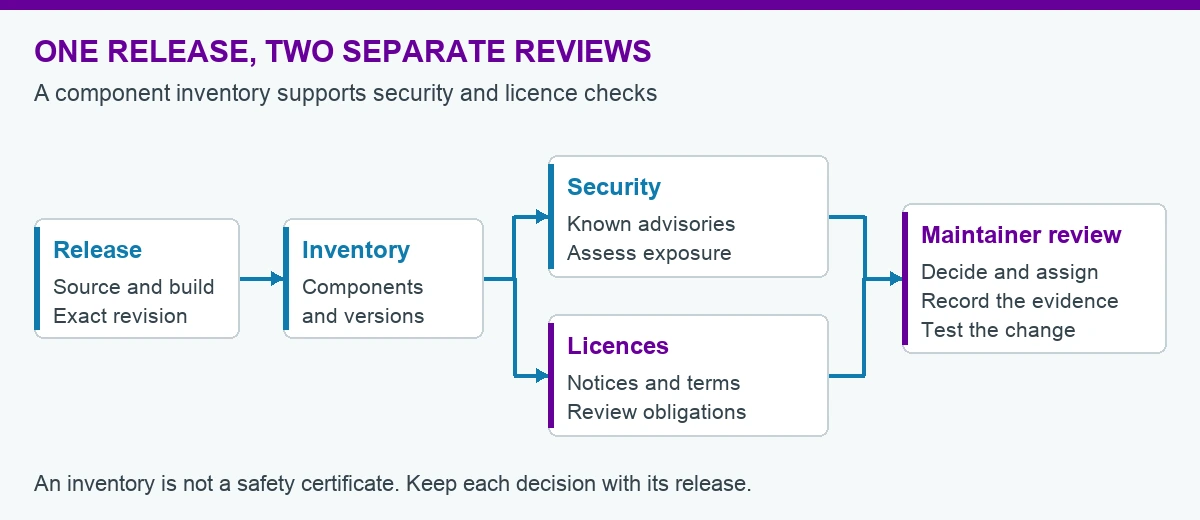
Start security checks with a reliable inventory
Tools for open source software security need an accurate view of the build. Include the libraries your chosen packages bring with them, known as transitive dependencies. A container may also contain operating system packages. Read the lockfiles that record resolved versions and, where supported, examine the built artefact. These views can differ. A report should say what was scanned and where coverage stops, rather than presenting an incomplete list as the entire application.
Make the inventory easy to recreate when the release changes hands. Store enough detail for another maintainer to repeat the check without searching old chat messages.
- Record the source revision or exact release being examined.
- Include the dependency files used by the build.
- Identify packages brought in through other dependencies.
- Note the scanner version and relevant configuration.
- Save the report with the release it describes.
Open source software security tools use published vulnerability information to flag possible problems. Check that a match concerns the right package and an affected version. Then assess exposure in your application and the available fix. An empty report does not establish safety: the database may lack a newly discovered issue, or the scanner may not cover a component.
A finding becomes useful when a maintainer can trace it to a release and decide what happens next.
Give licence compliance its own review
Licence obligations do not disappear when the security report is clear. Open source software compliance tools help gather notices, copyright statements and other evidence for a separate review. Teams can use that material to prepare attribution records or investigate an uncertain dependency. The output supports decisions; it does not decide every question about a licence or the way a project distributes software.
Imagine a contributor copying a helper file into the repository. Because no package manager installed it, the file might never appear in the dependency list. Scanning source files can reveal a notice that deserves attention. Someone still needs to establish where the file came from and review the relevant terms. Record the reasoning with the evidence, including unresolved questions, so future contributors can understand the decision.
Preserve both the evidence and the reasoning, so the next release can build on the review already done.
Choose a small set of tools that work together
Your programming languages and release formats should shape the choice. Try each candidate on a representative part of the project before adding it to the build. Check whether it reads your files correctly and produces results someone can explain. These examples illustrate complementary roles, rather than a ranking. Their current documentation remains the starting point for checking support and configuration.
| Tool | Main role | What to check locally |
|---|---|---|
| Syft | Generate component inventories | Coverage of your built artefacts |
| OSV-Scanner | Match dependencies to known vulnerabilities | Supported manifests and lockfiles |
| ScanCode Toolkit | Detect licence and copyright evidence | Results for copied source files |
| OSS Review Toolkit | Automate compliance workflows | Configuration and review effort |
Connect the results from open source software scanning tools to a specific release. A software bill of materials, or SBOM, records component information in a structured form. It is an inventory, not a safety certificate. Keep its security assessments and licence decisions close by. A modest setup with clear ownership often serves volunteers better than several overlapping scanners whose alerts nobody has agreed to review.
Make the findings useful to the next contributor
Decide how findings will reach maintainers before turning every alert into a release blocker. Let the team see the reports first, investigate recurring noise and agree which cases should stop a build. If a finding needs an exception, explain why and set a date to revisit it. Otherwise, a temporary choice can outlive the circumstances that justified it.
For communities built around shared development and funding, scanner results can become small maintenance tasks. Describe an outcome a contributor can demonstrate, with a named reviewer ready to assess it.
- Confirm which release and component the finding concerns.
- Describe the proposed update or licence review.
- Assign a maintainer to review the contribution.
- Test the change against the project's expected behaviour.
- Rerun the relevant check and retain the result.
Build a process your community can keep using. Begin with a trustworthy inventory, give security and licence questions separate attention, and retain the decisions beside each release. Add checks when the team has a clear use for their results. A tool earns its place when it helps someone complete a maintenance task and leaves enough context for the next contributor to continue the work with confidence.